You can easily control the opacity of colors in Illustrator. You can Control the opacity of the stroke and the fill individually by using the appearance panel. Directly under each stroke and fill layer in the appearance panel, there is an opacity section, where you...

Adobe
Multiple Masks on One Layer in Photoshop
This is a great method to get great masks in Photoshop. You can actually have 2 masks on an image at the same time. You can use a vector mask and use a custom shape to mask out an image, creating a clean mask for sharp edges. The pixel mask is great for creating...
Create a Dark and Gritty Effect in Photoshop
First, take your image and duplicate the background layer, so you can go back to your original if you need to. Hide the background layer and work from your copy. Go into the channels panel and hold down the command key (CTRL on the PC) and click on the RGB channel to...
The Future of Design and Advertising
I was asked a question yesterday that really got me thinking: What do you think the future will hold for design and advertising? What will be the next big platform to design for? I thought about this for a long time, and my guess is as good as yours. People are always...
Quiktip: Grids in Indesign
You can set up a good grid from the start of a new document in Indesign. When the New Document pops up, you can set the number of columns in your document. I tend to use either 3 or 5 columns. You can use as many as you want. I tend to try to keep it simple and to the...
Red Giant Software Announces Knoll Light Factory 2.7
For those of you that love good plugins, Knoll light factory is a very cool time saving addition to After Effects. The new edition works with CS5, and has a few new features as well. if you own an older version, you can upgrade for a reasonable price of $99, but if...
Make your text fit an object in Illustrator
I got this question yesterday, and thought that it would be a good topic for the day. If you want to fit text to a certain shape, you have a couple of options. The first option is to do what is called an envelope distort. First, you make your shape, and then take the...
Create a Psychedelic image in Photoshop
Create a Psychedelic image in Photoshop This is a neat trick that will give you some really interesting and extremely colorful results. To start off, create a new document. It can be any dimension that you want, and click ok. Mine is set at 1024 x 768. Then, create a...
Quiktip: Key Commands For Type
When creating type in Photoshop, and you are looking for just the right display face, it helps to use the key commands to get things just how you want them. If you double click your text icon next to the layer, it will highlight your text. Then, simply go up to the...
Is the New Mixer Brush in Photoshop Considered Cheating?
I was playing around with some of the new stuff inside of Photoshop CS5 and came across one of the new tools that they have included called the mixer brush. This is a great new tool that allows you to take a photo and use different settings to create a painting from...
Quiktip: Have The Masks Panel
The masks panel is a big help, because you can easily edit and refine your masks via a handy panel. From the masks panel, you can define the density of your mask, which is very handy. Instead of having a black and white mask, the density setting lessens the affect, as...
Create a Quick Photo Gallery Using Lightroom
I really like to create my own image galleries, but let's face it, in the real world, we can't always have things how we want them. Sometimes we need to get the job done in the best possible manner, as quickly and effectively as possible. When I need a quick image...
Playing with Opacity and FX In Illustrator
Opacity has a lot of uses for different types of effects. We like to see certain things bleed through in some areas, while in others we want a shape or text to be a certain color. Recently, I was playing around with opacity in the appearance panel in Illustrator, and...
This week’s places to go for inspiration #8
ARA IS ME WOOSTER COLLECTIVE DRAW CALIBER JANNIKE VIVEKA SOMEFIELD SPECTRA LOGO DESIGN LOVE DYSTEN
Web Site Design: Choose Your tools Wisely
There is certainly a lot to consider when laying out your site design. There are so many tools to help you out, and so many methods to get the job done. You really have to consider what your needs are, and which method will help you accomplish them. When I design a...
Create a Painterly Effect Easily In Photoshop
This is a neat trick that is easy and creates a subtle painterly effect with just two filters. First, find an image and open it inside of Photoshop. Then, hit Command +J (Ctrl + J on the PC) to duplicate your background layer. Do this twice, because we are going to...
Exploring the Blob Brush In Adobe Illustrator
This tool is one of the best tools if you want to create a sketch within Illustrator. You can really draw and add to an existing shape like you would if you were drawing with an ink pen. the best part about this, is that with a drawing tablet, you can very closely...
Easy Grids in Illustrator
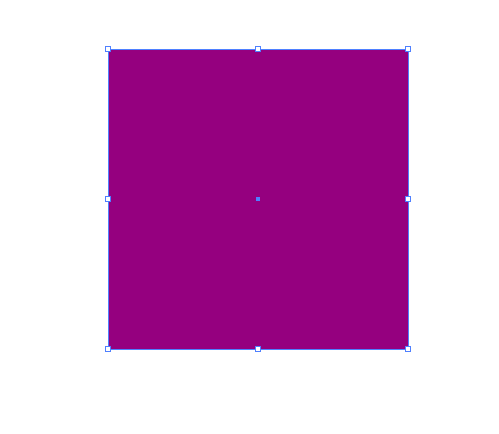
This tip is to save time when creating a group of squares or any type of grid in Illustrator. This is a good trick for making easy grids in Illustrator. For our purposes, I am creating a 300px by 300px square and it is filled with purple. You can make yours any color...
Adobe Launches Lightroom 3
Professional photographers and image editors alike will rejoice in knowing that Adobe has released Lightroom 3. Lightroom 3 has been given a lot of new enhancements to make cataloging your images much easier. Not only can you make quality adjustments to your images,...
Is There a Limit to How Much We Can Do?
I was having a discussion with a colleague the other day about design and all the things that we know how to do. The topic came up where he found out that i don't know ajax, which I admittedly, don't even know exactly what that does. My response to him was that I am a...